load balancer
Picture this: It’s Black Friday 2022, and I’m sitting in our war room watching our dashboard like a hawk. Our e-commerce platform is about to get hammered with 50x our normal traffic. Three years ago, a similar spike took us down for 4 hours. We lost $2 million in sales and countless customer trust.
But this time? Our servers hummed along smoothly. The hero of the day? Our load balancer architecture.
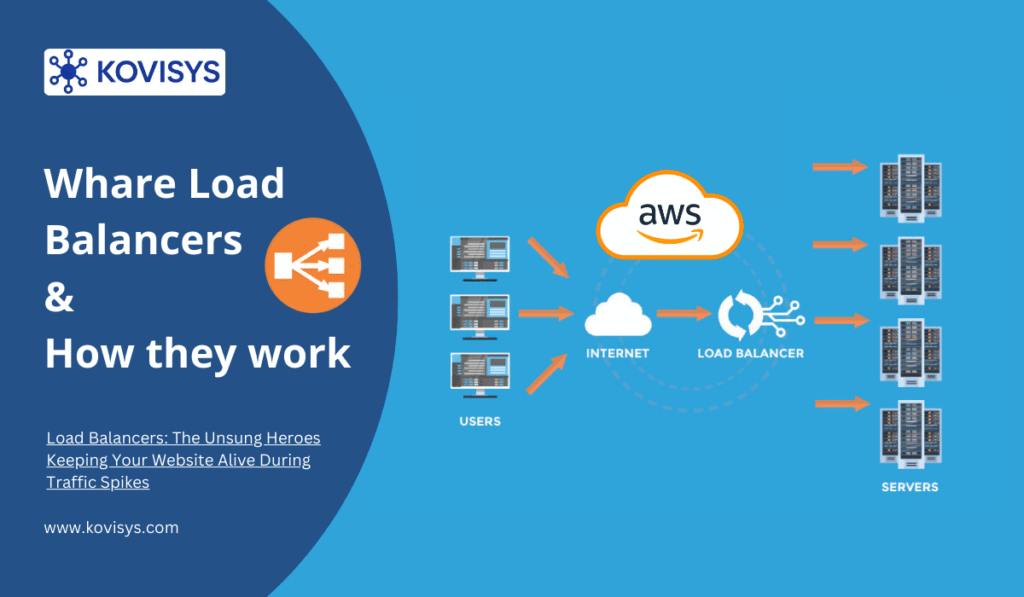
If you’ve ever wondered why Netflix doesn’t crash when a new season drops, or how Amazon handles millions of simultaneous shoppers, load balancers are a huge part of that answer. Let me walk you through what they are, how they work, and why every developer scaling past “hobby project” needs to understand them.
What Exactly Is a Load Balancer?
Think of a load balancer as a really smart traffic cop for your web servers.
Imagine you walk into a bank with 10 teller windows, but there’s only one entrance. Without someone directing traffic, everyone would mob the first teller while others sit idle. Chaos, right? A load balancer is that person at the entrance saying “You go to window 3, you go to window 7, you go to window 2.”
In technical terms: A load balancer is a device or software that distributes incoming network traffic across multiple servers to ensure no single server bears too much load.
The goal? Keep your application fast, available, and resilient even when things get crazy.
Why Should You Care?
Here’s the brutal truth I learned the hard way: A single server can only handle so much. I once built a beautiful Node.js API that worked flawlessly in development. Then we launched. Within two hours of a Product Hunt feature, requests started timing out. Users got error pages. Our single $80/month server was drowning.
Load balancers solve three critical problems:
1. Scalability – When traffic grows, you can’t just make one server infinitely powerful (vertical scaling has limits). You add more servers (horizontal scaling) and let the load balancer distribute traffic across them.
2. Reliability – Servers fail. Hard drives die. Updates go wrong. With a load balancer, if Server A crashes, it automatically routes traffic to Servers B and C. Your users never know anything happened.
3. Performance – By spreading requests across multiple servers, response times stay low even under heavy load. No more 5-second page loads during peak hours.
How Load Balancers Actually Work
Let’s get into the mechanics. When a user hits your website, here’s the journey their request takes:
Step 1: Request Hits the Load Balancer
User types yoursite.com. DNS points to your load balancer’s IP address (not directly to a server). The load balancer receives the request.
Step 2: Health Checks
Good load balancers constantly ping your backend servers (every few seconds) to check if they’re healthy. Healthy means responding correctly within a timeout window. Sick servers get temporarily removed from the rotation.
Step 3: Algorithm Selection
The load balancer uses an algorithm to decide which server gets the request. More on this in a moment.
Step 4: Request Forwarding
The chosen server processes the request and sends the response back through the load balancer to the user.
Step 5: Session Persistence (if needed)
For stateful applications, the load balancer can ensure a user keeps hitting the same server using sticky sessions or cookies.
Types of Load Balancers
There are two main categories, and I’ve used both depending on the situation:
1. Hardware Load Balancers
Physical devices from companies like F5 or Citrix. These are enterprise-grade beasts that can handle millions of requests per second.
Pros: Insanely fast, dedicated resources, excellent for large-scale operations.
Cons: Expensive (think $20,000+), requires physical setup, less flexible.
I’ve only worked with these at Fortune 500 companies. For most startups and mid-sized businesses, they’re overkill.
2. Software Load Balancers
Programs running on standard servers. Examples: Nginx, HAProxy, AWS Elastic Load Balancer, Google Cloud Load Balancer.
Pros: Affordable, flexible, cloud-ready, easy to configure.
Cons: Shares resources with other processes (though modern ones are very efficient).
This is what I use 95% of the time. Nginx as a load balancer has never let me down.
3. DNS Load Balancing
Technically a simpler approach where DNS returns different IP addresses for different requests.
Reality check: This is NOT true load balancing. DNS caching means users might keep hitting the same server for hours. I only use this for geographic distribution, not traffic balancing.
Load Balancing Algorithms: How Decisions Get Made
This is where it gets interesting. How does the load balancer actually choose which server gets the next request?
Round Robin (The Simple One)
Requests go to servers in a circular order: Server 1, Server 2, Server 3, Server 1, Server 2, Server 3…
When I use it: When all servers have equal capacity and requests are similar in complexity.
Gotcha: If Server 1 gets a heavy request and Server 2 gets a light one, Server 1 might still get the next heavy request. Not ideal for varied workloads.
Least Connections (The Smart One)
Sends requests to the server currently handling the fewest active connections.
When I use it: APIs where request complexity varies wildly. Some endpoints return in 50ms, others take 3 seconds. Least connections naturally balances this.
Real example: Our analytics dashboard had queries ranging from instant to 10-second reports. Least connections prevented slow queries from piling up on one server.
IP Hash (The Sticky One)
Uses the client’s IP address to determine which server they hit. Same IP = same server (as long as it’s healthy).
When I use it: Applications with server-side sessions. Shopping carts, logged-in user data, anything not in a shared database or cache.
Warning: This can create imbalances if a few IPs generate tons of traffic (looking at you, corporate proxies).
Weighted Round Robin (The Custom One)
Like round robin, but some servers get more requests than others based on their capacity.
Example: Server A (16GB RAM) gets 60% of traffic, Server B (8GB RAM) gets 40%.
When I use it: Mixed server capacities or when gradually rolling out a new server version. Give the new server 10% of traffic, monitor, then increase.
Least Response Time
Routes to the server with the lowest average response time and fewest connections.
When I use it: When performance is critical and I have servers in different regions or with different specs.
Real-World Implementation: What I Wish I Knew Earlier
Setting Up Your First Load Balancer (Nginx Example)
Here’s a basic Nginx config that actually works in production:
upstream backend {
    least_conn;  # Use least connections algorithm

    server 192.168.1.10:3000 weight=3;
    server 192.168.1.11:3000 weight=2;
    server 192.168.1.12:3000 weight=1 backup;

    # Health check settings
    health_check interval=5s fails=3 passes=2;
}

server {
    listen 80;
    server_name yoursite.com;

    location / {
        proxy_pass http://backend;
        proxy_set_header Host $host;
        proxy_set_header X-Real-IP $remote_addr;
        proxy_set_header X-Forwarded-For $proxy_add_x_forwarded_for;

        # Timeouts
        proxy_connect_timeout 5s;
        proxy_send_timeout 30s;
        proxy_read_timeout 30s;
    }
}
That backup directive on the third server? Game-changer. It only receives traffic if the first two servers are down. Perfect for emergency capacity.
Cloud Load Balancers: The Easy Button
Nowadays, I mostly use cloud-managed load balancers:
AWS Application Load Balancer (ALB): Great for HTTP/HTTPS, path-based routing (/api goes to API servers, /images to CDN). Integrates beautifully with auto-scaling.
Google Cloud Load Balancer: Truly global. I have users in Tokyo, London, and New York all hitting the same load balancer, which routes them to the nearest region automatically.
Cloudflare Load Balancing: Bonus DDoS protection and CDN. Slightly pricier but worth it if security matters.
Common Mistakes That Bit Me
1. Not Configuring Health Checks Properly
I once set health checks to only verify the server was responding, not that it was actually working. A database connection failure killed our app, but servers kept reporting “healthy” and getting traffic. Users got 500 errors for 15 minutes before we caught it.
Fix: Health checks should verify critical dependencies. Hit an endpoint that touches your database, cache, and core functionality.
2. Ignoring Session Persistence
Launched a load-balanced app without sticky sessions. Users logged in, then their next request went to a different server without their session. They got logged out randomly. Frustrating doesn’t begin to cover it.
Fix: Use sticky sessions (cookie-based) or move sessions to a shared store like Redis.
3. Forgetting About SSL Termination
You can terminate SSL at the load balancer (decrypt traffic there) or at backend servers (end-to-end encryption).
I prefer terminating at the load balancer for simplicity. One SSL certificate, less CPU load on backend servers. But if you’re paranoid about security (healthcare, finance), do end-to-end.
4. No Monitoring
A load balancer is only as good as your visibility into it. I use Grafana dashboards showing:
- Requests per second to each backend server
- Error rates by server
- Response times
- Current active connections
Without this, you’re flying blind.
Advanced Tips for Scale
Auto-Scaling Integration
Your load balancer should talk to your auto-scaling groups. On AWS, when CPU hits 70% for 5 minutes, spin up new EC2 instances. The load balancer automatically detects them and adds them to rotation. When load drops, terminate extras.
This saved us thousands in server costs. We run 4 servers normally, but spike to 12 during peak hours automatically.
Rate Limiting
Protect your servers from abuse by limiting requests per IP at the load balancer level. I typically set 100 requests per minute per IP for anonymous users.
Geographic Routing
Serve European users from European servers, Asian users from Asian servers. Latency drops dramatically. I cut our average response time from 400ms to 120ms for international users just by doing this.
Load balancers aren’t just for tech giants anymore. The moment you have more traffic than one server can handle, or the moment downtime costs you money or reputation, you need one.
Start simple: A basic Nginx reverse proxy or an AWS ALB costs almost nothing and takes 30 minutes to set up. As you grow, you’ll refine your algorithms, add health checks, implement auto-scaling, and sleep better knowing your site won’t crumble under success.
That Black Friday I mentioned? We handled 3.2 million requests without a hiccup. Our load balancer distributed traffic across 14 servers that spun up and down automatically as needed. Three years earlier, one server and a prayer failed spectacularly.
Don’t wait for your traffic spike to learn this lesson the hard way.

Don't Miss Out on Expert Insights!
Join 10,000+ smart readers who get our best articles, exclusive tips, and actionable strategies delivered straight to their inbox. No spam, no fluff—just valuable content you can't find anywhere else. Plus, get our free guide when you subscribe today!